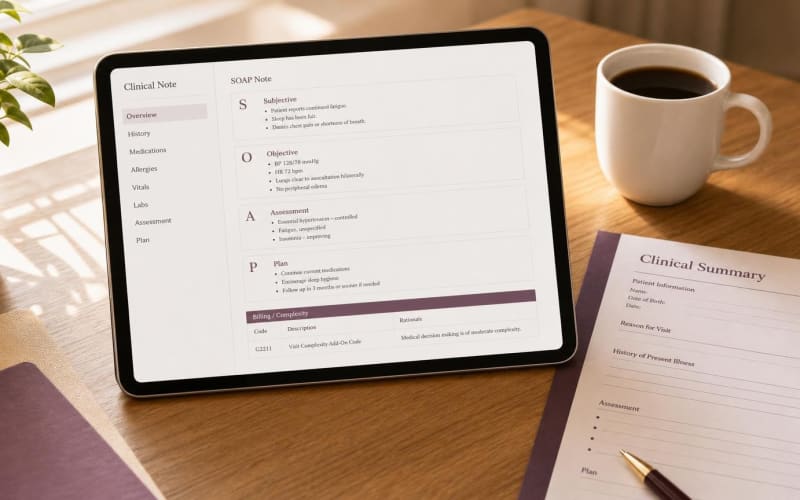
Tebra family medicine notes fail at the transfer step, not during the visit
Clinical documentation inside Tebra rarely fails because clinicians lack dedication. It fails at the handoff between what happened in the exam room and what lands in the encounter note. A family physician may manage hypertension, type 2 diabetes, depression screening, and a knee complaint in one 25-minute visit, then spend evening hours rebuilding that narrative inside SOAP fields and reconciling it with the superbill.
Merry AI closes that gap by working where the clinician already works: the active Tebra browser tab. The Chrome Extension reads the rendered encounter page, locates the native note fields, and writes clinician-approved text into them as plain, editable content. No Tebra server API, marketplace listing, or practice IT ticket is involved.
Browser-native DOM mapping bypasses EHR marketplace paywalls entirely
Traditional EHR integrations depend on vendor APIs, partner agreements, and per-practice provisioning. For small and mid-sized family medicine groups on Tebra, that path adds recurring fees and weeks of setup before a single note is written.
Field discovery happens at runtime, not from hard-coded selectors
Tebra does not publish DOM selector documentation, so Merry AI does not rely on fixed element paths. At page load, the content script scans visible textarea and contentEditable elements, then ranks candidates by label text and ARIA attributes such as Progress Note, Subjective, Objective, Assessment, and Plan. The highest-confidence match for each section becomes the injection target.
Injection writes plain text only. No hidden elements, scripts, or shadow markup are added to the page. Because the text enters Tebra's own fields, Tebra's native audit trail and version history record the entry exactly as if the clinician had typed it, which supports medico-legal defensibility.
Encounter route-change detection runs before every write
Tebra behaves like a single-page application. Switching from one patient's chart to another, or moving between Chart, Orders, and Billing tabs, can re-render the page without a full reload. A note written into the wrong encounter is a patient safety event, not a formatting error.
Before any injection, Merry AI compares the current encounter route against the route captured when the draft was generated. A MutationObserver watches for re-renders, and the extension rechecks the patient name, date of service, and encounter identifier visible on the page. If any value has changed, the Insert action is blocked and the clinician is prompted to reopen the correct encounter.
Every G2211 claim needs a principal care role statement before the Assessment
HCPCS add-on code G2211 recognizes the inherent complexity of E/M visits where the practitioner serves as the continuing focal point for all needed health care services, or provides ongoing care for a single serious or complex condition. Per the CMS G2211 FAQ, it may be reported with office/outpatient codes 99202-99205 and 99211-99215, and with home or residence codes 99341, 99342, 99344, 99345, and 99347-99350.
Merry AI writes the role statement first
When the clinician appends G2211, Merry AI inserts an explicit principal care role statement directly above the Assessment section. Example: 'I serve as this patient's primary care physician and continuing focal point for all needed health care services, including longitudinal management of HFpEF, type 2 diabetes with CKD stage 3a, and major depressive disorder.' Placing this before the Assessment means a reviewer reads the relationship before the reasoning.
The statement is parameterized, never boilerplate. Conditions, medications, and coordination activities are pulled from content already documented in the same note, so every G2211 sentence traces back to specific findings, referrals, and medication changes from that visit.
Family medicine complexity is documented across clinical domains
Family medicine complexity crosses specialties, so templates structure the narrative into subsections the G2211 statement can reference: Behavioral Health (PHQ-9, GAD-7, DSM-5-TR criteria), Cardiometabolic (A1c trend, eGFR, NYHA class, LVEF), Functional Status (range of motion, ADL impact), Pediatrics (developmental and immunization status), and Geriatrics (polypharmacy, frailty, caregiver context).
Modifier 25 is never auto-appended. When G2211 accompanies an E/M billed with modifier 25 on the same day as a listed Medicare Part B preventive service, such as an annual wellness visit or vaccine administration, Merry AI prompts the clinician to document the separately identifiable problem-oriented work. Code selection stays inside Tebra's superbill under clinician control, with CMS MLN006764 as the governing reference.
Three integration paths produce three different risk profiles
The table below compares the three ways a family medicine practice can move a documented visit into Tebra.
| Criterion | Traditional API Marketplace Integration | Manual Copy-Paste | Merry AI Chrome DOM Injection |
|---|---|---|---|
| Server API required | Yes, vendor partnership | No | No |
| IT approval and setup | Weeks of provisioning | None | None, extension install only |
| Recurring integration fees | Marketplace and per-seat fees | None | None |
| Wrong-chart protection | Depends on vendor | None, clinician vigilance only | Route-change check before every write |
| G2211 role statement placement | Rarely structured | Manual | Inserted before Assessment, parameterized |
| Tebra native audit trail | Varies by API scope | Preserved | Preserved, plain text only |
| Audio retention | Often retained for QA | Not applicable | Zero-day, RAM-only buffers |
Manual copy-paste looks free, but it costs clinician time on every encounter and introduces wrong-chart risk each time a clinician toggles between a scribe window and Tebra. API marketplace routes reduce that risk but shift cost and delay onto the practice.
Zero-day audio storage keeps the Tebra chart as the only durable record
Session audio is held only in volatile memory buffers, streamed for transcription, and discarded after processing. It is never written to local disk, browser IndexedDB, or persistent cloud storage. Transcripts persist only until the clinician accepts or rejects the draft, and the lasting artifact is the attested note inside Tebra under an executed BAA.
Consent controls are configurable per practice and state. A per-encounter indicator confirms the patient was informed of ambient listening, and a no-audio mode supports template-only drafting where practice policy or state law calls for it. Practices should still obtain legal review of the state statutes that apply to their locations.
Clinician attestation remains the final gate on every Tebra note
No draft reaches the chart without clinician action. Merry AI proposes text, and the clinician edits, inserts, and signs within Tebra. Family medicine templates are available at Access 1,000+ EHR Clinical Templates, and practices evaluating rollout can Schedule a 15-Minute Workflow Audit.